
A room-by-room walkthrough of the Google Business Profile that actually gets you found by nearby customers in 2026.
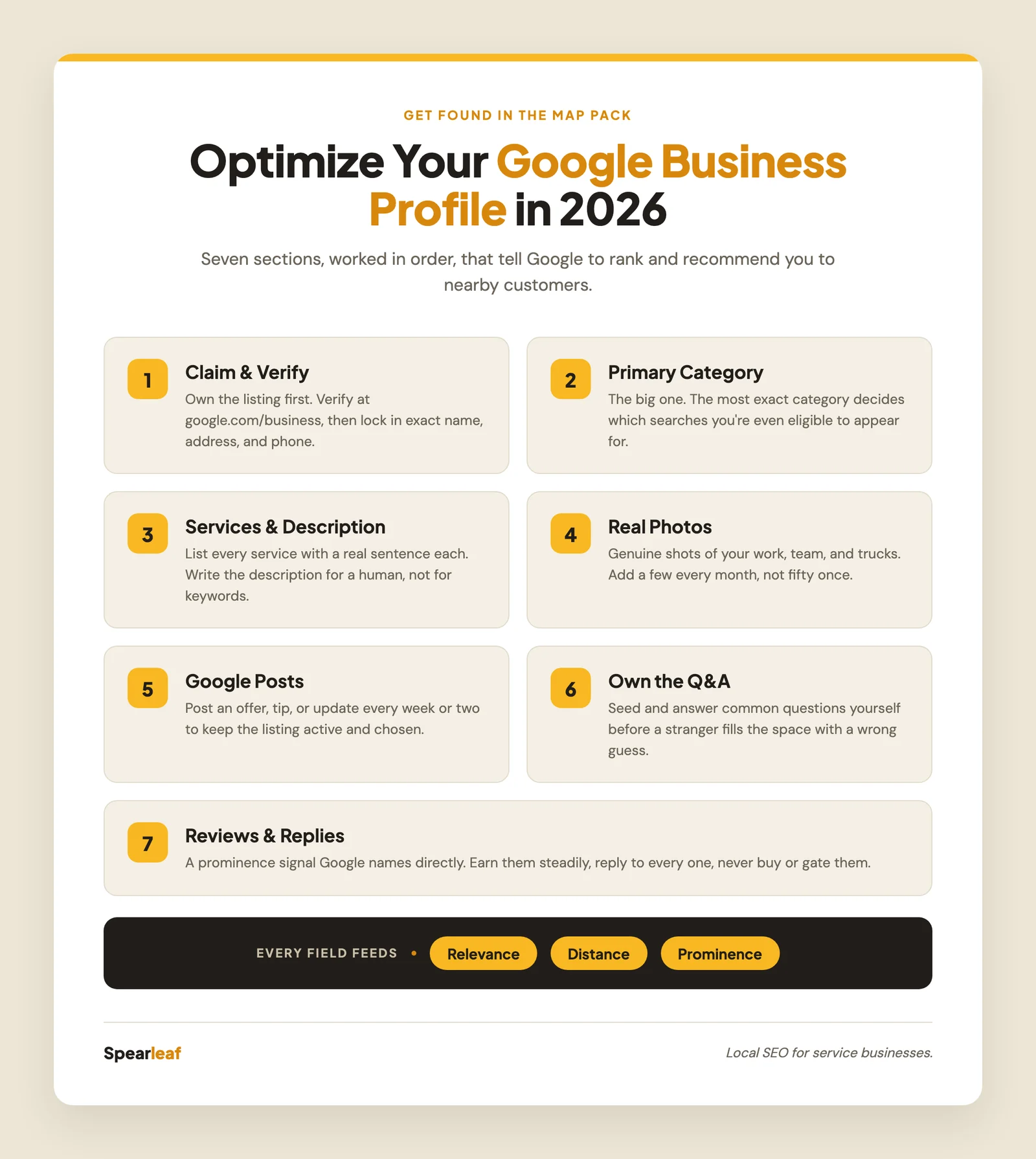
Here is how to optimize your Google Business Profile in 2026: claim and verify it, then work through every section (category, services, photos, posts, Q&A, and reviews) so it is complete, accurate, and active. The profile is where Google scores relevance, distance, and prominence, which is exactly why Google Business Profile optimization is the first thing I set up for any local business.
I'm Joshua Albanese, founder of Spearleaf, a local SEO agency in Fort Myers, Florida. I've built six businesses from zero using organic search, and the question I hear most from owners is some version of "I have a Google listing, so why am I not showing up?" Nine times out of ten the answer is the same. The profile exists, but it's half-filled and untended. So let me walk you through it, room by room, the way I actually do it for a client.

What does optimizing a Google Business Profile actually mean?
Optimizing your Google Business Profile means filling in and maintaining every section so Google has enough accurate information to rank and recommend you. It is not one setting you flip on.
Your profile is the single asset Google reads to score all three of its named local factors: relevance, distance, and prominence. If you want the full breakdown of those three, our Map Pack ranking factors guide unpacks each one. For this walkthrough, the important part is simpler. Every field you complete feeds one of those factors, and every field you leave blank is a signal you're handing to a competitor instead.
I think of a profile like a storefront. A dark shop with no sign gets walked past. A lit, labeled one gets walked into. Same street, same customers, different outcome. The rest of this post is how you turn the lights on and keep them on.
One note before we start. If you want the tight, printable version to check your work against, I keep a separate GBP optimization checklist with every field in order. This post is the walkthrough; that one is the do-list.
Step one: claim and verify the profile
Before any of the good stuff matters, the profile has to be yours. You claim it at google.com/business, and Google verifies you own the business, usually by video or a phone-and-email process now rather than the old postcard.
This trips people up more than it should. Plenty of businesses have a Google listing they've never claimed, one Google auto-generated from other data. Until you verify it, you can't edit the category, respond to reviews, or add photos. So if you're staring at a listing you can't control, that's almost always the missing step.
Verify it, then set the foundational facts and never leave them inconsistent: your exact business name, address, and phone number. Those three, matched everywhere they appear online, are what Google uses to trust your information. Inconsistent listings across the web are a quiet ranking killer, and if you're invisible for "near me" searches, our post on why your business isn't showing up on Google walks through how that breaks.
Step two: pick the right primary category (this is the big one)
Your primary category is the most important field on the entire profile, because it decides which searches you're even eligible to appear for.
Google confirms categories directly influence which local searches you rank in, and I've watched a single wrong category quietly cost a business every relevant search. A "Dental clinic" competes for dentist searches. The same office set to "Doctor" simply falls out of them. Same building, same team, invisible.
Here's how I choose:
- Pick the single most accurate primary category. Not the broadest, the most exact. "Emergency plumber" beats "Plumber" if that's what you actually are and want to rank for.
- Add relevant secondary categories. You can list additional categories for the other real services you offer. Add every one that genuinely applies, and none that don't.
- Match how customers describe you, not internal jargon. Search the category list for the words a customer would type, and pick from what Google offers rather than forcing a label.
Get this field wrong and everything downstream is wasted effort. Get it right and the rest of this walkthrough compounds on top of it.
Step three: fill out services and the business description
Once the category is set, your services and description tell Google the specifics of what you do, which sharpens your relevance for longer, more detailed searches.
Add every service you offer as its own entry, and write a real sentence or two for each one in plain language. Don't just list "Repairs." Describe it the way you'd explain it to a customer on the phone. Those descriptions give Google more genuine text to match against the specific things people search for.
The business description field is your space to say who you are, who you serve, and where. Write it for a human first, naturally including your services and areas. Skip the keyword-stuffing; Google is long past rewarding it. Say plainly what you do and for whom, and you'll cover the terms that matter on their own.
While you're in here, set accurate hours (including holiday hours) and add attributes that apply, like "wheelchair accessible," "women-owned," or "free estimates." Small fields, but they surface you for filtered searches and answer questions before a customer asks.
Step four: add real photos, and keep adding them
Photos are one of the most under-used levers on the profile, and one of the easiest wins, because a profile with recent, genuine images almost always draws more views and clicks than a bare one.
The keyword is real. Not stock photos, not a single logo uploaded three years ago. Show the actual business: your storefront or your trucks, your team, before-and-after shots of jobs you've done, the inside of your shop. Customers are checking whether you look legitimate and local, and real photos answer that instantly.
Make it a habit, not an event. A few fresh photos every month tells Google the business is active and gives customers a current picture. I'd rather see a client add three honest photos monthly than fifty at once and never return. And label the basics: a clear logo and a cover photo that represents you well set the tone before anyone reads a word.
Step five: use Google Posts to keep the profile active
Google Posts are short updates (offers, events, news, tips) that appear right on your profile. They don't directly raise your ranking, but they keep the listing active and give a searcher a reason to pick you over a quieter competitor.
Post something every week or two. It doesn't need to be elaborate: a seasonal reminder, a current offer, a note about a job you just finished, a quick tip. The value is twofold. It signals to Google that the business is current, and it occupies more of your listing so a live, updated profile stands next to a stale one and wins the click.
Think of posts as the difference between a shop with a fresh sign in the window and one with a faded flyer from last year. Same store. Very different first impression.
Step six: work the Q&A section yourself
The Q&A section is a public list of questions and answers on your profile, and here's the part most owners miss: anyone can answer, including strangers who guess. So you should seed and answer it yourself.
Write out the questions you get asked most (do you offer free estimates, what areas do you serve, are you open weekends) and answer them from your own account. This does two useful things. It gives customers instant answers, and it fills the space with accurate information before someone else fills it with a wrong guess. Check back regularly for new questions and answer them the same day when you can.
It's a small section that quietly builds trust and heads off the friction that loses a call.
Step seven: build reviews, and reply to every one
Reviews are a prominence signal Google names directly, and they're the last thing a customer reads before deciding to call you. Quantity, rating, and recency all matter, which makes steady reviews one of the highest-return habits in local SEO.
The system is simple and ethical. Ask happy customers right after a good experience, make it effortless with a direct review link, and reply to every review you receive, the good and the awkward ones alike. Responding shows Google the profile is tended and shows future customers you're present and professional.
One hard line: never buy reviews, never gate them so only happy customers can leave one, and never write fake ones. It violates Google's policy and puts your whole profile at risk, and it's simply not how we work. Our guide on getting more Google reviews lays out the full system for earning them the right way.
Does an optimized profile alone get me to the top?
An optimized profile is the foundation, but on its own it usually isn't enough to top a competitive Map Pack. It's necessary, not always sufficient.
A complete, active profile makes you eligible and competitive, and in a low-competition area it can be most of the battle. In a crowded market, the profile works alongside real service pages that feed relevance, consistent business information across the web, and community links that build prominence. Our guide on what local SEO actually is puts the profile in that wider context.
The encouraging part is that none of it is a trick. Optimizing your Google Business Profile is a matter of being genuinely findable: accurate category, real services, honest photos, an active listing, and reviews you earned. It also increasingly feeds AI search, since answer engines lean on the same verified, consistent signals, which is why we fold AI search optimization into the same effort. Do the fundamentals well and keep doing them, and you become the business Google shows first.
The questions I hear most from owners optimizing their Google Business Profile, answered plainly.
Ready to turn your profile into your best salesperson?
Optimizing your Google Business Profile comes down to a clear sequence: claim and verify it, pick the exact right category, fill out every service and detail, add real photos and keep adding them, post regularly, own the Q&A, and earn reviews you reply to. Do that consistently and you show up for the nearby customers already searching, on both the Map Pack and the new AI answers. If you'd rather have a team build and maintain all of it in the right order, our Google Business Profile optimization is designed to grow durable local lead flow for service businesses, with no long contract, just the fundamentals executed month after month.
This article was written by Joshua Albanese, founder of Spearleaf, a local SEO and marketing agency based in Fort Myers, Florida. Joshua has built six businesses from zero using organic search and content, and he leads Spearleaf's SEO, AI search, and local strategy for service businesses across the U.S.
Frequently asked questions
How do I optimize my Google Business Profile in 2026?
Start by claiming and verifying the profile, then work through it section by section: pick the most accurate primary category, add every service you offer with written descriptions, upload real photos of your work and team, publish Google Posts regularly, seed and answer the Q&A section yourself, and earn reviews steadily while replying to each one. The profile is where Google scores relevance, distance, and prominence, so completeness in every field is what moves you up. None of it requires tricks, just accuracy and consistency over time.
What is the most important part of a Google Business Profile?
Your primary category is the single highest-leverage field, because it tells Google which searches you are even eligible to appear for. A dentist listed under 'Dental clinic' competes for dentist searches; the same office mislabeled as 'Doctor' quietly disappears from them. After the category, review quantity and recency carry the most weight, since Google names reviews directly as a ranking signal and customers read them before they call. Get the category exactly right first, then build reviews as an ongoing habit.
How many photos should I add to my Google Business Profile?
There is no magic count, but profiles with a steady stream of real, recent photos tend to earn more views and clicks than bare listings. Add a genuine mix: your storefront or vehicles, your team, before-and-after shots of actual jobs, and your logo and cover image. Keep adding a few every month rather than uploading fifty once and never returning, because freshness signals to Google that the business is active and gives customers a current picture of who you are.
Do Google Posts help SEO?
Google Posts do not directly lift your ranking, but they keep your profile active, occupy more space on your listing, and give searchers a reason to choose you over a quieter competitor. Think of them as the difference between a lit-up shop and a dark one. Posting an update, offer, or event every week or two shows both Google and customers that the business is current, and an active profile tends to out-convert a stale one even when rankings are similar.
How often should I update my Google Business Profile?
Treat it as a living asset, not a one-time setup. Check it monthly for accuracy, especially hours around holidays, add fresh photos, publish a post or two, answer any new questions in the Q&A, and respond to every review as it comes in. Google rewards profiles that stay active and accurate, and customers trust a business that clearly tends its listing. A profile you touch every few weeks will almost always outperform one you completed once and forgot.
Want your profile working this hard without doing it yourself? See how our Google Business Profile optimization builds durable local lead flow.
Learn more →