
Your category choice quietly decides which searches you can win. Here's how to pick the right ones.
Picking the right Google Business Profile categories is the single setting that most quietly decides which searches you can win, and most owners get it wrong by guessing. Your primary category tells Google what your business is, and it heavily shapes whether you show up in the Map Pack for the searches that bring you customers. It's a core part of Google Business Profile optimization, and it takes about ten minutes to get right.
I'm Joshua Albanese, founder of Spearleaf. I've built six businesses from zero using organic search, and category selection is one of the first things I check on any new profile. It's the fix I see move rankings fastest, because so many owners never gave it real thought. Let me walk you through how it actually works.
What are Google Business Profile categories?
Google Business Profile categories are the labels you attach to your listing that tell Google what your business does. You pick from Google's fixed list, not free text, and each label maps your business to a set of searches.
Think of a category as a translation layer. A customer types "emergency plumber" and Google needs to know which nearby businesses match. Your category is how it decides. When your category says "Emergency Plumber Service" and someone searches that phrase, you're eligible to appear. When your category says nothing close, you usually aren't.
There are two kinds. Your primary category is the one label that best describes your core business. Your secondary categories are additional labels for the other real services you offer. Both matter, but they don't matter equally, and that's where most of the strategy lives.
Why do categories matter so much for ranking?
Categories are one of the strongest relevance signals Google uses to decide which searches you show up for. Get the primary wrong and the rest of your profile can't save you.
Google publicly names relevance, distance, and prominence as its three local ranking factors. Your category is the biggest lever you control on relevance. Distance is mostly fixed by your address, and prominence takes months of reviews and links to build. Category, by contrast, you can fix this afternoon, and the effect on which searches you're eligible for is immediate.
Here's what that looks like in practice. I've seen a business set to a broad, safe category like "Contractor" while their competitors used the specific "Roofing Contractor." The specific business ranked for roofing searches; the broad one didn't, even though both did roofing every day. The specific label matched the search word for word, and Google rewarded the match. If you want the full picture of how relevance fits with the other factors, our Map Pack ranking factors guide breaks all three down.
How do I choose my primary category?
Choose the single most specific category that names your main service, using the exact words your customers search. Specific beats broad almost every time.
Start with the money question: if a customer could only find you for one search, what would it be? That search is your primary category. A med spa that makes most of its money on injectables should think hard before defaulting to the generic "Medical Spa" if "Skin Care Clinic" or a more specific option matches better. The goal is the label that maps to your highest-value search.
Then follow three rules when you're weighing options:
- Pick specific over broad. "Roofing Contractor" beats "Contractor." "Family Law Attorney" beats "Attorney." The more specific label matches more precise, higher-intent searches, and Google favors the closest match.
- Match the customer's words, not your industry's. Search Google's category list for how a customer would describe you, not the technical term you'd use with a peer. If people search "AC repair," a category built around that beats an insider term.
- Only choose what you actually do most. Your primary should reflect real, frequent work, not an aspiration. Setting it to a service you rarely deliver sends Google, and customers, the wrong signal.
If two categories fit and you can't decide, pick the one tied to the search you most want to win, then watch your rankings and adjust. Category choice isn't permanent.
How do I use secondary categories?
Add a secondary category for every real service you offer that a different primary can't cover, and stop there. They broaden your reach without diluting your core signal.
Google lets you add up to nine secondary categories, but the number is a ceiling, not a target. Each one you add should map to actual work you do. A plumbing company might carry "Plumber" as primary, then "Water Heater Installation," "Drain Cleaning Service," and "Gas Installation Service" as secondaries, because it genuinely does all three. That's a clean, honest list.
The mistake is treating secondaries like keywords to stuff. Adding "Bathroom Remodeler" to a pure plumbing profile because remodeling searches look attractive doesn't help you rank for remodeling. It muddies what Google thinks you are and can pull you into searches you'll never convert. Every irrelevant category is a small vote against your clarity.
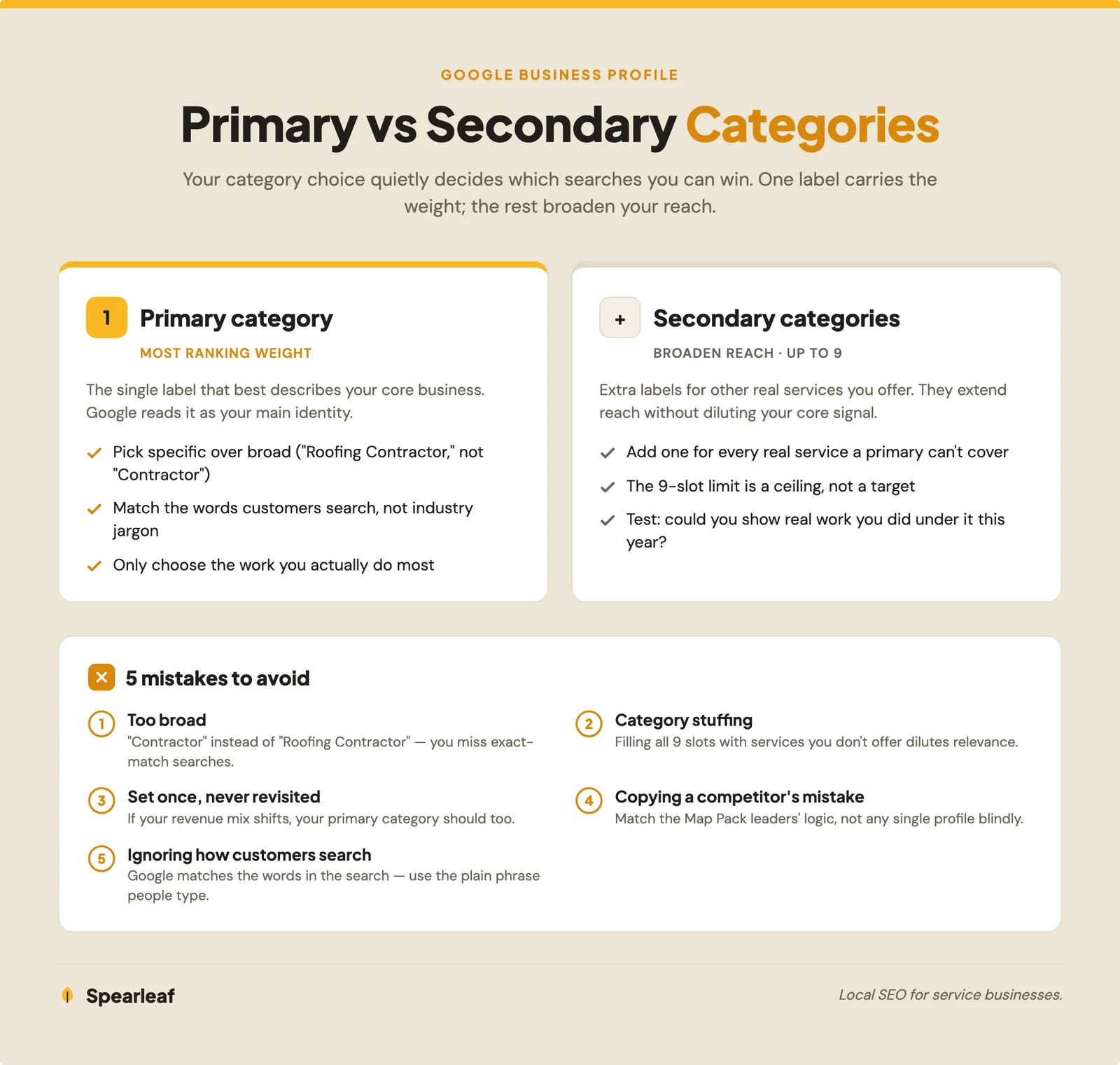
A good test for any secondary: could you show a customer real work you've done under that label this year? If yes, keep it. If you're reaching for a "maybe someday" service, leave it off until it's true.
How do I research my competitors' categories?
Look at the businesses already ranking in the Map Pack for your main search and reveal the exact categories they use. Those are the businesses Google already trusts, so their choices are a live answer key.
Start by searching your main keyword and noting the three businesses in the Map Pack. Those three, not a random competitor across town, are the ones you're actually competing with for that search. Click into each profile.
You can read the primary category Google shows near the top of a listing, right under the business name. To see the full picture, including secondary categories a competitor is using, install a free browser extension. GMB Everywhere and PlePer both reveal a profile's primary and all its secondaries in a click, at no cost. Google's own help documentation on how businesses appear in local results is worth reading alongside this, so you understand what those categories feed into.
Once you've pulled the top three competitors' categories, look for the pattern. If all three use the same primary, that's the label Google associates with the search, and yours probably should match. Where their secondaries differ, you'll spot services you offer but haven't listed, and searches you've been leaving on the table. Copy the logic, never the dishonesty: only adopt a category you truly serve.
What are the most common category mistakes?
The most common mistake is choosing a broad category when a specific one exists, which leaves you competing for vague searches instead of the precise ones that convert. A few others show up again and again.
- Too broad. "Contractor" instead of "Roofing Contractor." You blend into a crowded, generic pool and miss the exact-match searches.
- Category stuffing. Loading all nine secondary slots with services you don't really offer. It dilutes your relevance and can surface you for searches you can't serve.
- Set once, never revisited. Your category should track your business. If your revenue mix shifts toward a new service, your primary probably should too.
- Copying a competitor's mistake. The business ranking above you might have a suboptimal setup and win on reviews or age. Match the Map Pack leaders' logic, not any single profile blindly.
- Ignoring how customers actually search. Choosing the industry-insider term over the plain phrase people type. Google matches the words in the search, so use the words your customers use.
Getting the categories right is foundational, but it's one piece of a complete profile. Reviews, photos, and accurate service-area settings all reinforce your relevance, and our Google Business Profile optimization checklist walks through the rest in order. If you're still not appearing at all, our post on why your business might not be showing up on Google covers the usual culprits, and a wrong primary category is near the top of that list.
The questions I hear most from owners setting up or fixing their categories, answered plainly.
Ready to set your profile up to win the right searches?
Your categories are the quiet setting that decides which searches you can rank for at all. Pick the most specific primary that matches how customers search, add only the secondary categories you truly serve, study the businesses already winning the Map Pack, and revisit your choices as your business changes. It's a ten-minute fix with an outsized payoff. If you'd rather have a team choose, test, and maintain the whole profile alongside your local SEO, our Google Business Profile optimization is built to put you in front of the customers already searching.
This article was written by Joshua Albanese, founder of Spearleaf, a local SEO and marketing agency based in Fort Myers, Florida. Joshua has built six businesses from zero using organic search and content, and he leads Spearleaf's SEO, AI search, and local strategy for service businesses across the U.S.
Frequently asked questions
How many Google Business Profile categories should I use?
Use one primary category that names your main service, then add only the secondary categories you genuinely offer. Google lets you add up to nine secondaries, but you almost never want all nine. Every category you add signals to Google what you do, so a tight, honest list beats a padded one. Two to five well-chosen categories total is a healthy range for most local service businesses. Add a category only if you can point to real work you do under it.
Can I change my Google Business Profile category later?
Yes, you can change your primary category or edit your secondaries at any time from your profile. Changes are usually reviewed quickly, though a big shift can trigger a re-verification. Because your primary category has real ranking weight, treat a change as a deliberate move, not something to test casually. If you switch it, give it a few weeks and watch your Map Pack visibility before deciding whether the new choice was right.
What is the difference between a primary and secondary category?
Your primary category is the single label that best describes your core business, and it carries the most ranking weight of any category on your profile. Secondary categories are additional labels for other real services you offer. Google reads your primary category as your main identity, so it heavily shapes which searches you can rank for. Secondaries broaden your reach into related searches without diluting that core signal, as long as you only add ones you actually serve.
How do I find out what categories my competitors use?
Search your main keyword, click a competitor's profile, and use a free browser tool like GMB Everywhere or PlePer to reveal their primary and secondary categories. You can also read the category label Google shows near the top of their listing. Look at the two or three businesses ranking in the Map Pack, not just any competitor, since those are the ones Google already trusts for your search. Their primary category is a strong clue about what yours should be.
Does my Google Business Profile category affect my ranking?
Yes, your category is one of the strongest relevance signals Google uses to decide which searches you appear for. If your primary category does not match what someone searches, you will struggle to rank no matter how good the rest of your profile is. Picking the most accurate, specific category that matches how customers describe your service is one of the highest-impact moves you can make. It is often the difference between showing up and staying invisible.
Want your profile set up to win the searches that actually bring you customers? See how our Google Business Profile optimization works.
Learn more →